


Usage Guide
- ▶ About the product
- ▶ New member registration
- ▶ About the members program/points
- ▶ How to order
- ▶ About the cart
- ▶ About coupons
- ▶ wishlistAbout
- ▶ About order history
- ▶ Payment methods
- ▶ About receipts
- ▶ About shipping and handling charges
- ▶ About overseas shipping services International Shipping
- ▶ About product delivery
- ▶ About ordered products
- ▶ About restock notification
- ▶ Changing/adding/cancelling orders
- ▶ About checking the shipping status
- ▶ About store pickup
- ▶ About exchanges and returns
- ▶ About the mail magazine
- ▶ Contact us
- ▶ Guidelines for commercial use
- ▶ About withdrawal
About products
・Prices displayed in the online store include tax.
・Due to the nature of monitor display, the color of the product photo may differ slightly from the actual product.
・Color, shape, and size may differ depending on production time and size, and due to natural materials and handmade products.
・Products available vary depending on the store. When purchasing at a store, please contact the store directly atbefore coming to the store.Please come and visit us.
・Our accessory parts are sold with the assumption that they will be used as accessories. Please handle with care to prevent small children from licking, putting it in their mouth, or swallowing it. For more information on handling
, accessory parts, and metal fittings, please click herehere
New member registration
「KiwaseisakujoTo use the online store, membership registrationis required.Membership registration is free.
When making your first purchase, please register from the membership registration screen. Regarding the personal information provided by customers, we will strive to protect the personal information based on the following regulations.
Click here for the privacy policyhere
About the Members Program and Points
About the Members Program (membership rank) system
The membership rank is determined according to the purchase amount, and the point award rate changes.
| Membership rank | Purchase amount | Point return rate |
|---|---|---|
| Regular | 0~4 9,999 yen | 1% |
| Bronze | 50,000 to 99,999 yen | 2% |
| Silver | 100, 000 - 299,999 yen | 3% |
| Gold | 300,000 - yen | 5% |
[Rank determination]
・Rank judgment date: 1st of every month
・Judgment target period: Past 1 year (365 days) from the judgment date
*Membership registration is required for the membership rank system.
*Purchase results are from June 2, 2026 onwards. Purchases made before then are not eligible.
About points
・The basic point return rate is 1 point for every 100 yen (tax included) of the total product purchase price.
・Points are only applicable to the product amount, so there are no deductions from shipping and handling fees.
・Points will be awarded at stores atwhen payment is completed, and at online stores at when shipping is completed.
・If you make a purchase using points, you will not receive points for that purchase.
・You can use them for future purchases as "1 point = 1 yen". You can check your
, number of points, and usage history from My Page by logging in.
・You cannot add or change the points you use after your order is completed.
・The expiration date of points is one year from the last award.
Example) If you earn 100 points on 2023/11/20, the expiration date will be 2024/11/19.
・Please note that points will expire and cannot be used after the expiration date.
Use points at the online store
・Points will be applied when you set the points to use on the payment screen.
<Note>
・If the total amount is less than 5,000 yen after using points, shipping charges will be incurred.
・Kiwa crystals Large Pack(gross) is not eligible for points.
Download the official app, log in, and use the following steps. There is no need to log in from the second time onwards.
・If you are a member of the online store, you can log in with the same account.

(1) Tap "My Page" in the bottom menu.
(2)Please show the "barcode" displayed at the top to the store staff. You can collect and use points.
(3)Tap the barcode on My Page and your "membership card" will be displayed.
You can also collect and use points from the barcode on your "membership card."
How to order
(1) Log in or register as a member
Press the login icon, enter your email address and password in the form, and log in.
*If this is your first time (Kiwaseisakujoif you do not have a password for the online store), please register as a new member.
(2) Search for products and recipes
You can search for products and recipes by category from "Products" and "Recipes" in the menu. From "Search", you can search for products and recipes using free words.
《One point》
You can select the display method on the product list screen, so please take advantage of it.
View in image: Color nine-up is easy to see.
View details: It is easy to see the expansion of size and number of inputs. You can add it to your cart from the list screen.
(3) Add the product to the cart
Once you have decided on the product you want, enter the quantity for parts products and press "Add to Cart".
For recipe products, you can add all the parts to your cart by pressing "Add checked ingredients to cart." If you want to change the number of parts to purchase for a recipe product, you can do so in the cart.
(4) Checkout
Check the products on the cart screen and press "Proceed to purchase" to proceed to the payment screen.
If an error message is displayed in your cart and "Proceed to checkout" is not displayed, please adjust or delete the products and quantities in your cart according to the contents of the error message.
Example: ○○○ is out of stock. → There are more items in your cart than in stock, so please adjust the purchase quantity.
Example: It is not possible to order "ordered products" and "regular products" at the same time. → Delete either the "ordered item" or the "regular item" from your shopping cart, complete the payment for one item, and then place your order again.
(5) Select delivery address and payment method
You can choose to receive at a designated address or in-store.
Specified address delivery allows you to deliver to a different address in addition to the registered address. You can add the delivery address information by pressing "∨" (image ①) displayed in the upper right corner.
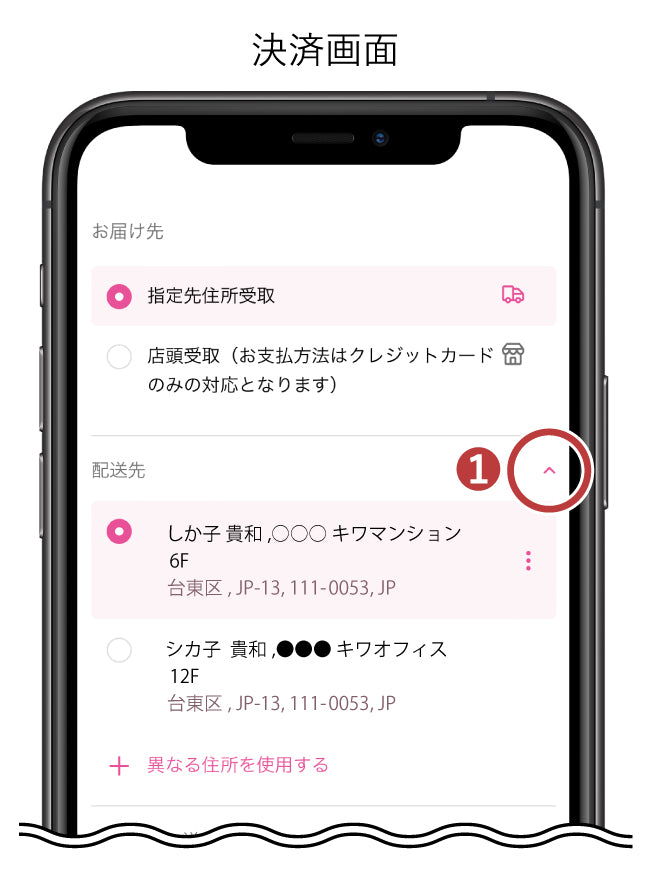
Payment methods can be chosen from credit card payment, PayPal, atone next month deferred payment (convenience store/account transfer), deferred payment (convenience store/bank ATM), PayPay, and cash on delivery.
*If you choose to pick up your order at a store, you can only use "credit card payment".
About the cart
Items added to the cart while logged in will be automatically saved using the "Cart save function". If there are items in your cart when you last logged in, a pop-up will appear asking you to combine or delete the cart contents.
If you leave the item unused for a certain period of time, your session/login will expire and the contents of your cart will be cleared, but if you are logged in and shopping,you will be returned to the cart with the items in it when you log in again.
<When the item is deleted from the cart>
・When the customer "deletes" the item himself/herself.
・When you combine the contents of your cart with [Product A] out of stock in your cart, [Product A] that is out of stock will be deleted from your cart.
<Please note>
*The product will not be in stock until all purchase procedures are completed.
*Product prices and quantities are subject to change. Please note that if an item is left in your cart for a long period of time, the information may differ from when you added it to your cart. About
Coupons
KiwaseisakujoWe issue coupons that can be used at stores and online stores on the official app. Coupons may be distributed fromKiwaseisakujoduring events and fairs. Please take advantage of it.
[How to obtain and use coupons (common to birthday coupons and various coupons)]

Coupons will be delivered toapp's My Page.
(1) Tap "My Page" at the bottom right of the app.
(2) Tap the coupon received on the app's My Page.
・If using online store

(3) When the coupon is displayed, tap "Use on EC".

(4) Tap "Change".
*Please note that once you press it, you cannot use it at the store.

(5) Tap "Copy code" to copy.
*Even if you close the app, you can still view this page by tapping the coupon (*(2)) from My Page.
*Coupons vary by account.

(6) Tap
"Add discount" on the online store payment page.

(7) Paste the code you copied in (5) into "Coupon Code" and press "Apply".
(8) After confirming that the coupon contents are reflected in your order,
(9) Click the "Confirm Order" button to complete the payment.
When using at a store
Please present the app's coupon screen to the store staff at the time of checkout.
・KiwaseisakujoBirthday coupons are issued on the official app.KiwaseisakujoThis message is sent to customers who have registered as members on the official app and have their birthday registered in the app's member information.
・Please register your birthday in the member information of the app by the day before your birthday. You will receive a birthday coupon around 9:30 AM on the day of your birthday.
・Birthday coupons can be used for 40 days from your birthday.
- You may have entered the code incorrectly or the coupon has expired. Please check again before purchasing.
・Coupon cannot be used in conjunction with other coupons.
・KiwaseisakujoCoupons will not be distributed outside of the official app. Please be careful about coupon sites that are not affiliated with us.
・Please note that if you use a coupon and cancel your order after payment has been completed, the coupon cannot be returned.
wishlistAbout
You can save the product to "wishlist" by pressing the heart mark next to the "Add to cart" and "Check materials/purchase" buttons.
Saved products and recipes can be viewed on thewishlistpage.
In addition,wishlistRegistered products will have a pink heart mark displayed on the product page and recipe page.
You can use thewishlistfunction without logging in, but the contents will be cleared after a certain period of time. If you want to save your content, please log in.
About order history
You can check your order history from the order history on My Page. By pressing
order numberpush, you can check the details, repurchase the product, cancel (only orders that meet the conditions), and issue a receipt.
Repurchase of previously ordered products
[Repurchase process]
(1) My page → Order history → Press the order number → Go to order history details
(2) On the order history details page, there is a list of products and a "Repurchase" button. You can add the item to your cart by clicking the "Repurchase" button.
<Note>
・When you press "Repurchase", all products will be added to the cart with "Quantity 1".
・Please change the quantity in your cart.
*Backordered or discontinued products will not be added to your cart.
Cancel
You can cancel your order from your order history. There are conditions for cancellation. To cancel an order, click herehere
Issue a receipt
You can issue a receipt from your order history. For issuing a receipt, please click herehere
Payment method
Please select the payment method below.
[Credit card payment] [PayPal] [atone next month deferred payment (convenience store/account transfer) [email billing]] [Deferred payment (convenience store/bank ATM) [email billing]] [NP deferred payment (Convenience store/Post office/Bank/PayPay) [Postal request]] [PayPay] [Cash on delivery]
*If you choose to pick up your order at a store, you can only use [Credit card payment]. For store pickup, click herehere
Credit card payment
[Available credit cards]
VISA|Master Card|JCB|AMERICAN EXPRESS|Diners Club

Payment can only be made once.
Please use a credit card in your name.
You will need to enter your card number, expiration date, and security code on the payment screen.
In order to ensure the safety of our customers, personal information such as credit card information is encrypted.
Credit card payments will be processed within 3 business days after placing your order. For items that require time to be shipped, payment will be made in advance. Thank you for your understanding. Please read and agree to the
Privacy PolicyPlease read and agree to the following.
PayPal
Click here for payment procedures with Paypal(Go to PayPal's official page)
■Notes
If you are using a Diners Club card, it will only be treated as a Discover card when paying with PayPal, so the payment will be made in US dollars. Therefore, there may be a difference between the payment amount displayed in Japanese yen on the online store and the amount withdrawn.
Please check with your card issuer for the exchange rate for your payment.
atone Next month payment (convenience store/account transfer) [Email request]

atone is a next month payment that anyone can use immediately.
You can pay for this month's usage at once at a convenience store or by bank transfer the following month.
You can use it by logging in with your registered mobile phone number and password.
(If you have not registered as a member, you will need to register as a new member.)
You can earn 1 point for every 200 yen, which is a great value for NP points that can be used for shopping at atone. For more information, please visitatone's official page.

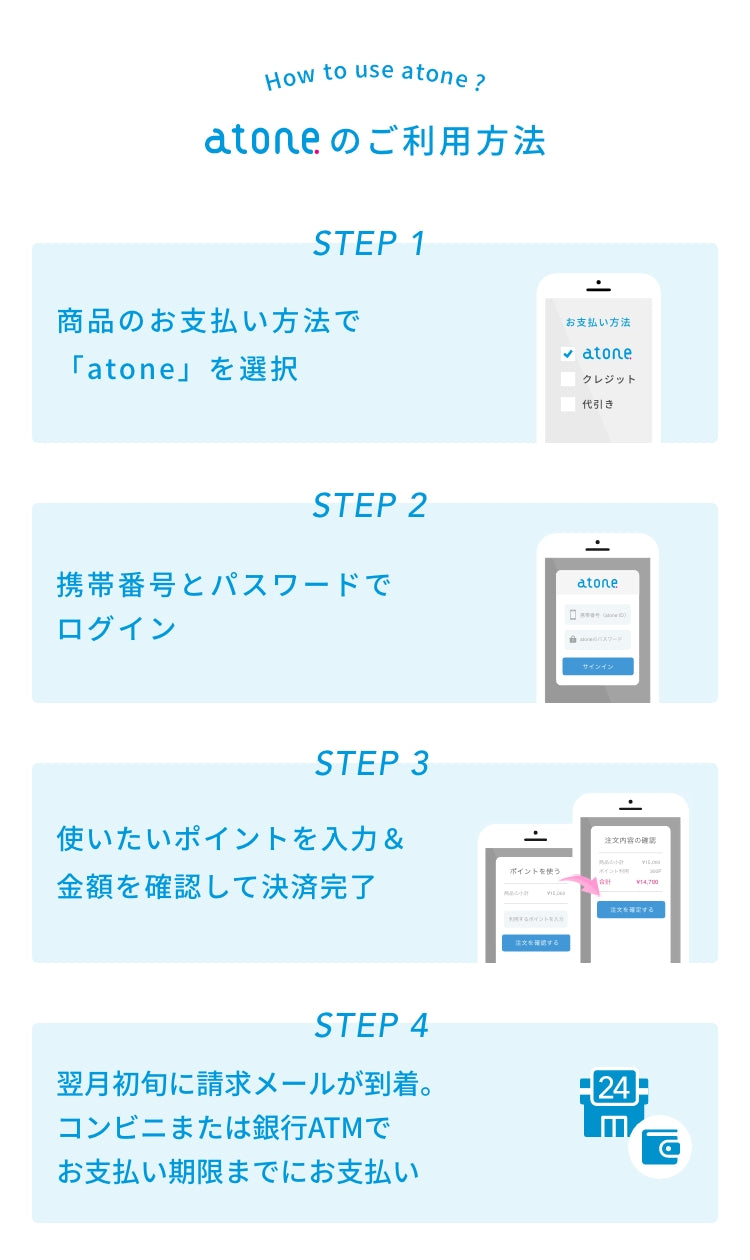
■Payment method
We will email you the number required for payment at the beginning of the month following your purchase.
Please pay by the 10th of the following month using a convenience store terminal such as Loppi or a bank ATM (Pay-easy).
You can choose from the following four payment methods. Please complete the procedure by the end of the month using the smartphone app or web My Page.
(1) Convenience store terminal / Bank ATM (Pay-easy) *Standard setting
(2) Electronic barcode (Convenience store)
(3) Postcard bill (Convenience store)
(4) Account transfer
*Convenience store terminal / Bank ATM (Pay-easy) cannot be paid at 7-Eleven.
*Electronic barcode/postcard bills can also be paid at 7-Eleven.
■Notes
・Payment fees are free.
・The following billing fee will be charged only in the month of use.
[Until July 2026]
Convenience store terminal/Bank ATM (Pay-easy): 209 yen (tax included)
Electronic barcode (convenience store): 209 yen (tax included)
Postcard bill (convenience store): 209 yen (Tax included)
Bank transfer: 99 yen (tax included)
[For use after August 2026]
Convenience store terminal / Bank ATM (Pay-easy): 249 yen (tax included)
Electronic barcode (convenience store): 249 yen (tax included)
Postcard bill (convenience store): 349 yen (tax included)
Bank transfer: 99 yen (tax included)
*For more information, please also seeThis noticePlease also see.
・Payment due date varies depending on the payment method.
・Payment will be made in accordance with Net Protections Co., Ltd.'sMembership Terms and Conditionsby the specified method.
・You may receive an invoice email before the product is shipped.
■Atone service provided by Net Protections Co., Ltd. applies.
■For inquiries and FAQs, click here:atone Beginner's Guide
■About receipts
KiwaseisakujoWhen issuing a receipt from My Page of the online store, the receipt will only be for the product and shipping fee, not including the billing fee.
Also, Net Protections Co., Ltd. cannot issue a receipt for only the billing fee. Thank you for your understanding.
Deferred payment (convenience store/bank ATM) [email request]

This is a safe and easy ``deferred payment'' that allows you to pay at a ``convenience store/bank ATM'' after completing your order.
All you need is your mobile phone number and email address.
■Payment process
・We will notify you of the invoice amount by email and SMS the day after your order is confirmed. Please pay within 10 days.
■Notes
・Deferred payment fee is 209 yen. (Fee after August 1, 2026: 249 yen (tax included))
・The fee will be charged in the specified method based on theMembership Terms and Conditionsof Net Protections Co., Ltd.
・For details, please visitatone's official page.
・You may receive an invoice email before the product is shipped.
■Atone service provided by Net Protections Co., Ltd. applies.
■Contact Us - Frequently Asked Questions:atone Beginner's Guide
■About Receipts
KiwaseisakujoWhen issuing a receipt from My Page of the online store, it will be a receipt for only the product and shipping fee, not including any deferred payment fees.
Also, Net Protections Co., Ltd. cannot issue a receipt for only deferred payment fees. Thank you for your understanding.
NP deferred payment (convenience store/post office/bank/PayPay) [Mail request]

■Details of this payment method
This is a safe and easy payment method that allows you to pay deferred at a convenience store, post office, bank, or PayPay after confirming the arrival of the product.
The invoice will be mailed separately from the product and must be paid within 14 days of issue.
If payment cannot be confirmed after the payment deadline, additional fees may be added.
■Please note
Store pickup serviceis not available.
You cannot specify a post office drop-off or temporary accommodation such as a hotel or hospital as the shipping address. (*1)
Deferred payment fee:252 yen (excluding tax) (Fee after 0:00 on October 1, 2026: 257 yen (excluding tax))
For deferred payment orders,Net Protections Co., Ltd.'s deferred payment service will be applied, and the payment receivable will be transferred to the company. Please agree to
NP Postpaid Terms of Use and the company's privacy policyand select the Postpaid service.
Deferred payment fee of 252 yen (excluding tax) (fee after 0:00 on October 1, 2026: 257 yen (excluding tax)) is not included in the total amount displayed when ordering on theKiwaseisakujoonline store.
Also, please note that it will not be included in the amount displayed in the order history on My Page or in the total order amount on the receipt.
The usage limit is up to 55,000 yen (tax included) in cumulative balance.Please click on the banner for details.
If the user is a minor, please use with the consent of a legal representative.
■Invoice sending timing
Kiwaseisakujo, it will be shipped by Net Protections Co., Ltd. on the next business day.
You may receive an invoice before the product arrives, or it may take up to 10 days after the product is shipped. Thank you for your understanding.
■About receipts
Your payment receipt will serve as your receipt.
Convenience store: Payment receipt, Bank: Transfer slip (usage statement)/passbook entry, Post office: Payment slip/receipt, PayPay: Payment completion screen/invoice (payment slip)
*Receipt types vary depending on the payment location.
*If you would like to use an invoice paid with PayPay as a proof document, please check with the recipient to confirm its validity.
*TheKiwaseisakujoEligible Billing Business Registration Number will not be printed on these.
KiwaseisakujoWhen issuing a receipt from My Page of the online store, it will be a receipt for only the product and shipping fee, not including any deferred payment fees.
Also, Net Protections Co., Ltd. cannot issue receipts for only fees. Thank you for your understanding.
(*1) If the destination is a hospital, hotel, or school, please enter "Manager," "Working in XX Department," "Employee," etc. in the department column. This will be taken into account during the screening process, and you may be able to specify it as the delivery destination.
PayPay
PayPay payment procedure is here(Go to the official page of SB Payment Service)
Cash on delivery
When the product is delivered, please pay in cash to the delivery company (Japan Post).
Please note that in addition to the shipping fee, a cash on delivery fee of 330 yen (tax included) will be charged.
*Cash on delivery fee will still be charged even if we reply to the sender for some reason.
About the receipt
Credit payment, PayPal, atone, next month payment, deferred payment,NP deferred payment, you can issue an electronic receipt (PDF) on My Page after the product is shipped. (Sample of electronic receipt)
The address will be the name registered in the member information.Please note that it cannot be changed when the receipt is issued.
[Issuance timing]
・If you specify a designated address for receipt, it will be issued after the product is shipped.
・If you specify in-store pick-up, it will be issued after the customer picks up the product at the store. However, since we will process the receipt after receiving the item, the button may not be displayed immediately after receiving the item. Thank you for your understanding.
[Issuance procedure]
(1) Access your order history from My Page.
(2) Press the "Order number" of the order for which you want to issue a receipt in the order history list.
(3) Press the "Issue receipt" button at the top of the page.
(4) The receipt (PDF) will be displayed on the screen, so you can save it as data. As a general rule, a receipt can only be issued once.
<Note>
If you close or go back to the page after the receipt (PDF) is displayed, the print environment will be set in advance. Please press the "Issue Receipt" button.
[For cash on delivery]
If you would like a receipt, please tell the delivery person that you would like a receipt. Product delivery and shipping charges
About product delivery and shipping charges
Product delivery
[Standard delivery (delivered to your home, etc.)] We will ship within 3 business days from the date of receipt of your order.
We do not accept installment payments.
The product will be delivered by Japan Post's Yu-Pack.
Delivery only within Japan.
[Store Pickup] Your order will arrive at your store within 5 to 10 business days from the date your order is received. We will notify you by email when it arrives at the store.
For in-store pickup, please click herehere
*Shipping is not available on Sundays and holidays. Some orders placed on Saturdays, orders made during holidays, Golden Week, Obon, and New Year's holidays, or if we are very busy with a large number of orders, may take some time to ship your order.
*For remote islands, shipping will be by sea.
*If you purchase adhesives, batteries, etc., they will be delivered by sea as air transport is not possible when delivering to Hokkaido and Okinawa prefectures. Please note that it may take more than a week for the package to arrive.
In addition, in the unlikely event that an item is out of stock, we will contact you by email or phone.
Shipping fee
Shipping is free if the total purchase amount is 5,000 yen (tax included) or more.If the order amount is less than 5,000 yen (tax included), the shipping fee will be borne by the customer. The price is 530 yen (tax included) nationwide.
Free shipping for in-store pickup.
About overseas shipping service
Overseas shipping/International Shipping
KiwaseisakujoOur online store uses WorldShopping. You can ship overseas by using the services of the overseas delivery companies listed below. If you wish to have your order delivered overseas, please use the services below.
You can purchase Kiwaseisakujo products from overseas. We have introduced WorldShopping service who will purchase on behalf of you and deliver it to your doorstep. With support available in multiple languages, enjoy shopping in Kiwaseisakujo.
■International Shipping Guide
■WorldShopping
・WorldShopping is a "proxy purchasing service for Japanese e-commerce sites" operated by Zigzag Co., Ltd.
・KiwaseisakujoOnline store membership registration is not required.
・WorldShopping offers special carts that support multiple languages: English, Chinese (simplified/traditional), and Japanese.
・Please refer to the WorldShopping official website and FAQ for details.
■WorldShopping Official
https://www.worldshopping.global/
■WorldShopping FAQ
https://www.worldshopping.global/en/help/faq/
About product delivery
Delivery is limited to Japan. We will ship your order within 3 business days from the day we receive your order.
(*Shipping is not available on Sundays and public holidays.It may take some time for some orders to be shipped on Saturdays, holidays, Golden Week, Obon, New Year's holidays, or if there are a large number of orders and we are very busy.)
Also, in the unlikely event that an item is out of stock, we will contact you by email or phone.
We do not accept installment payments.
About ordered products
Products marked as "ordered products" (such as someKiwa crystalsLarge Pack) are ordered from domestic/overseas warehouses and manufacturers, or are made to order, so depending on stock status, it may take more than 3 business days to ship. In addition, the delivery date may vary depending on the product, so please be aware of this before placing your order.
Also, it may not be possible to order it due to the manufacturer discontinuing it. We will contact you in that case.
[Flow from ordering to shipping]
(1) Items that are displayed in the inventory status column as "ordered products" are "backordered products."
↓
(2) When you press the "Add to Cart" button, a message will be displayed. Check the content and press "Agree" to add the item to your cart.
↓
(3) "Backordered items" and regular items cannot be added to the cart at the same time. If you add both items at the same time, an error message will be displayed in your cart, so please delete either "Back Order Items" or "Regular Items" in your cart and update your cart.
↓
(4) Please proceed to "Proceed to Purchase" from within your cart and finalize your order.
↓
(5) We will check the delivery date of the "ordered item" and if it can be shipped within 3 business days, we will ship it sequentially.
↓
(6) Only if shipping takes more than 3 business days, we will notify you of the delivery date by email.
<Note>
*“Backordered products” cannot be ordered at the same time as regular products.
*If the "ordered item" and regular item are in the same cart, you will not be able to proceed to the purchase process.
*We cannot bundle "ordered products" and regular products together.
*Please refrain from canceling "ordered items".
*Delivery date may vary depending on the product.
*It may not be possible to order this item due to the manufacturer discontinuing it.
*If you order multiple "backorder items", we will ship them as soon as all the items are available.
*Payment methods other than cash on delivery, such as credit card payment and deferred payment, will be processed at the time of order completion. For items that require time to be shipped, payment will be made in advance.
Thank you for your understanding regarding the above.
About restock notification
Products that are displayed as "Restock Notification" are currently not in stock at the online store.
If you press the "Restock Notification" button and apply for a stock notification email, we will notify you by email to the email address you entered when the item is back in stock.
*Please note that even if you apply for "restock notification", if the product is no longer available, you will not receive an email notification.
*Application for "restock notification" is different from an order or reservation, so it does not guarantee acceptance of your order or delivery of the product.
*If the product becomes difficult to arrive, the notation on the page may be changed to "Sold Out".
Changes/additions/cancellations to orders
Changes/additions
If there are any changes to your order, please cancel your order from My Page and place a new order.
If you place a new order, the product may not be available due to changes in stock status. Thank you for your understanding.
Cancellation
You can cancel your order from My Page within 1 hour of receiving the order.
*However, there is a possibility that we may not be able to accept cancellations depending on the shipping status. note that.
[Cancellation Procedures]
(1) Access your order history from My Page.
(2)Click the "Cancel" button for the order you wish to cancel in the order history list to complete the cancellation
*Cancellation is possible within 1 hour of receiving the order. If the "Cancel" button is gray and cannot be pressed, you cannot cancel.
[Steps to add the same item to cart after cancellation]
Cancellation history will also remain in the order history.
(1) Access your order history from My Page.
(2) Press the "order number" of the canceled order in the order history list and proceed to the order history details.
(3) You can add the item to your cart again by clicking the "Repurchase" button on the page.
*All quantities in the cart are 1. If you have more than 1 bag, please change it in your cart.
*Backordered or discontinued products will not be added to your cart.
About checking the shipping status
After shipping, we will send you a shipping completion email containing the Yu-Pack tracking number. You can also check from "Order History" on My Page.
About in-store pickup
About in-store pickupClick here
About exchanges and returns
Please check within one week whether the delivered product is the same as the ordered product and whether there are any damages or defects.
In the event of an error on our part (misdelivery, damage, defect), we will accept exchanges or returns. Please contact us fromContact us. Please note that we cannot accept exchanges or returns due to customer convenience.
Returns, exchanges, refunds, and other inquiries regarding purchased items through secondary distribution such as online auctions, flea market sites, and apps are the responsibility of the seller, so we will strictly refuse to respond to any inquiries, regardless of whether the item has been opened or unopened.
Exchange/Return in Case of Misdelivery
If there is a misdelivery (missing or incorrect product), please contact us within one week of receiving the product. We will provide additional shipping/exchange (refund only if out of stock).Exchange/return in case of damage or defect
We take every possible measure to ensure the quality of the product we deliver, but if there is damage during shipping, we will exchange it (refund only if it is out of stock) only if you contact us with details within one week of receiving the product.Example where we cannot accept exchanges or returns
We cannot accept returns or exchanges due to customer's convenience.<Example>
●I ordered the wrong color, shape, size, quantity, etc.
●It was different from the image _●Products that have been used once
●Products used once
●Products that have become dirty, scratched, or damaged by the customer
Products that can be returned or exchanged must be in unused condition. We cannot accept products that have been processed or processed in any way.
Also, please note that there may be cases where the product is not defective due to the characteristics of the product.
If your product comes with a warranty, please contact the manufacturer directly.
We do not accept returns or exchanges of products purchased from the online store at the store.
About the email magazine
For information on registering/cancelling the email magazine, etc.Click here
Contact information
Contact us For further information, please click hereClick here
Guidelines for commercial use
Regarding commercial use of “parts”
KiwaseisakujoProducts purchased can be used for commercial purposes. (Some items are not applicable (e.g. finished products, kits/sets, licensed products, collaboration products, etc.)
Please check the terms of use below before using.
●There is no problem in using the parts purchased from us to create and sell accessories with your original design. Please take advantage of our products. Please refrain from posting text using the name
●「Kiwaseisakujo. (Example: "This part can be purchased atKiwaseisakujo", "Please contactKiwaseisakujo", etc.)
●Please refrain from selling products with our name on them as they are. (Things with the name "Kiwaseisakujo" in them, such as OPP bags, tools, kits, and sets)
●Please refrain from selling items in our bags.
●Selling our recipes is prohibited. (See "About the use of 'recipes'" below)
●We will not be held responsible if any defects occur in the finished product using our parts. Regarding commercial use of ``
「Kiwa crystals''
is available for commercial use.
Please check the terms of use below before using.
*If you are a company or an individual business owner and would like to use crystal glass parts in large quantities for your business, please contact the Foreign Business Department (Kiwaseisakujo Foreign Trading Department (gaisho-1@kiwa-inc.co.jp) by email.
●When describing the parts used, it is possible to write something like "Kiwa crystals(Austrian-made crystal) used". If you would like to include an explanation of
●Kiwa crystals, you can quote the text below.
“「Kiwa crystals" is a crystal glass with very precise cuts.
It is produced by an Austrian manufacturer with a proven track record in a wide range of fields such as fashion, jewelry, and interior design, achieving high professional quality. ”
About commercial use of “recipes”
●The copyright of our recipes, etc. belongs to Kiwaseisakujo, Inc., regardless of paid or free, printed matter, or data format. Unauthorized copying, scanning, digitization, etc., unauthorized reproduction, unauthorized distribution, or sale of any or all of our recipes, etc. is prohibited.
●We ask that you refrain from selling works that are exact copies of designs published in our recipes. (It is possible to arrange and use it as an inspiration source.)
About the use of "images"
●KiwaseisakujoCopyrighted materials such as texts and images in the online store belong toKiwaseisakujoCo., Ltd. Reproduction and unauthorized reproduction are prohibited.
About withdrawal
You can cancel your membership yourself.
[How to unsubscribe]
Browser
After logging in, press "Withdraw" on My Page and accept to complete the withdrawal procedure.
Application
You can do so by clicking the unsubscribe button in the account information on my page. Due to the specifications of the app, if you have a purchase history on the online store, you will not be able to cancel your membership using the app. We apologize for the inconvenience, but please log in from your browser and cancel your membership from My Page.
After canceling your membership, all points you hold will expire and will not be returned even if you register as a member again. You will no longer be able to check member information such as ``
「wishlist'' and ``order history.'' How to use